Chrome – How to clean cache, cookies and local storage for a specific domain

And here is one more post from the special series: “How it could be so simple?”. Actually, this is the first one, but such situations are so common in my routine that I will start to write more about this.

What inspired me to write this article, despite the hint, is how I found the solution. I had to clean cache, cookies and local databases from a specific domain on Chrome, of course, keeping other domains untouched. After 1 minute looking at Chrome config page, I quit and went to the web for some research. After another minute, I’ve found incredible forum posts, even in stackexchange, from guys asking for extensions to do it. Wait a minute. Is that a kind of basic goal too hard to reach?

I’ve stopped, think and… voilá! It’s a quite simple fellows:

On the page you want to clean cache, click right mouse button on a “free area” and select the “View page info” option.
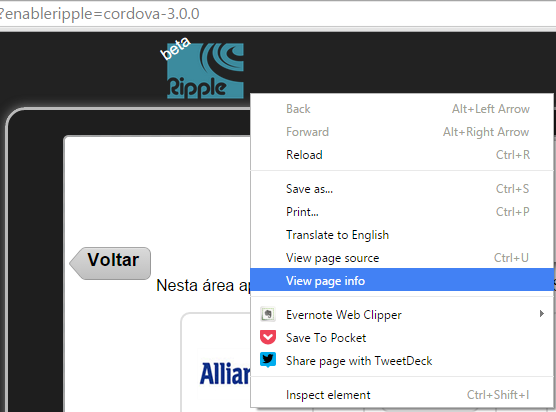
View page info

On the options’ screen, select the “Show cookies and site data”:

Show cookies and site data

And then you might see this:

Cookies set by this page

On this screen, you can access to all domain data, from cookies to websql storage. Easy!

And all this happened just because I had to erase a simple local sqlite on my ripple emulator. 🙂
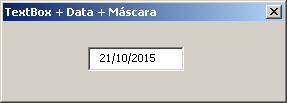
VBA – TextBox Date Mask (updated)

Máscara de data (e uma pequena homenagem)

A long time ago, I published a hint which coming from the forum that explains how to set a TextBox to have a mask, like date, phone, etc in the link bellow:

https://www.tomasvasquez.com.br/blog/microsoft-office/vba-fomatar-textbox-data-telefone-cpf-nos-eventos-keypress-e-change

The code works well, but it has a bug for date mask. The bug don’t allow ther user to erase all text using the backspace or delete key. Well, after some effort, here is a way to fix it:

Private KeyCodeToAvoid As MSForms.ReturnInteger
 
Private Sub TextBoxData_KeyDown(ByVal KeyCode As MSForms.ReturnInteger, ByVal Shift As Integer)
    Set KeyCodeToAvoid = KeyCode
End Sub
 
Private Sub TextBoxData_KeyPress(ByVal KeyAscii As MSForms.ReturnInteger)
    'Limita a Qde de caracteres
    TextBoxData.MaxLength = 10
 
    'para permitir que apenas números sejam digitados
    If KeyAscii < Asc("0") Or KeyAscii > Asc("9") Then
        KeyAscii = 0
    End If
 
End Sub
 
Private Sub TextBoxData_Change()
'Formata : dd/mm/aaaa
'não avalia se for backspace ou delete
    If Not (KeyCodeToAvoid = KeyCodeConstants.vbKeyBack Or KeyCodeToAvoid = KeyCodeConstants.vbKeyDelete) Then
        If Len(TextBoxData) = 2 Or Len(TextBoxData) = 5 Then
            TextBoxData.Text = TextBoxData.Text & "/"
            SendKeys "{End}", True
        End If
    End If
    'zera o keycode
    KeyCodeToAvoid = KeyCodeConstants.vbKey0
End Sub

I hope you enjoy it!